Showing posts with label HowTo. Show all posts

How to add "Email Subscription Form" to your blog(blogger,blogspot)

Friday, August 28, 2009

How to add "Email Subscription Form" to your blog(blogger,blogspot)


This post explains how to add "Email Subscription Form"to your blog:

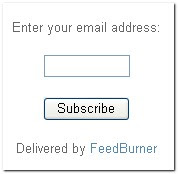
If are a new blogger,you may have seen an email subscrtiption form like the below one in other blogs while browsing.

It is delevered by FeedBurner.When people subscribe,they will recieve a email with your blog posts whenever your blog is updated.It is a very easy thing and make your visitors come back again and again to your blog.


So,Let's see how to add a "Email Subscription form" like that in your blog:

1.First,Sign in to your FeedBurner account.If you don't have a FeedBurner account yet,you can register it here


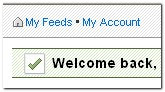
2.Click on the "My Feeds" link at the top of the page and next ,click on your blog name[look at the below screenshot]


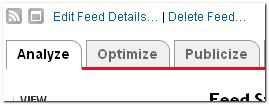
3.Next,Click on the 'Publicize' tab as shown below.


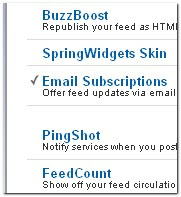
4.Select the "Email Subscriptions" option[look at the left sidebar]


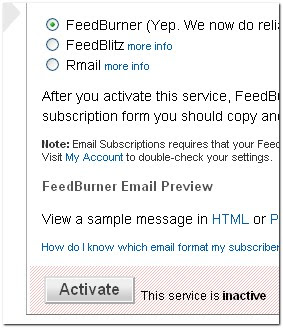
5.Next, you will see like this


Click on 'Activate'

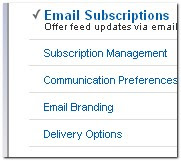
6.If you look at the sidebar now,there are a few more options under the Email Subscriptions column namely Subscription Management,Communication Preferences,Email Branding and Delivery options.Edit them according to your needs.

Now,Click on the Subscription Managemant option and copy the code they provide[see the below *screenshot*]


7.Um............Finally,the last step

Sign in to your blogger dashboard>layout>add a page element>html/javascript

and paste the code and SAVE THE CHANGES.


That's it!..........too long process know? No.Very simple process to do.

OK.Why don't you subscribe to this site Email updates -So,you will be up to date with the latest blogger tips and tricks.More & More coming soon................

READ MORE - How to add "Email Subscription Form" to your blog(blogger,blogspot)

Popular Posts (Most Commented) Widget for Blogger Blogs


Popular Posts (Most Commented) Widget for Blogger Blogs


Over the past few weeks, many of you have expressed an interest in such a widget, and I hope this will become a useful widget for you all.

You can see this widget in action and install this in your own Blogger powered blog using the widget installer below.


Please note: if you are reading this post in your feed reader, you will not see the widget installer and will need to visit this page in your browser instead!

On the right you can see an example of the Popular Posts widget, which displays the ten most popular posts from Blogger Buster (including their comment count). This widget uses Yahoo! Pipes to parse and display each item in the list using the last 5000 comments which have been made on this blog.

Installing this widget in your own Blogger blog is easy:

  1. Change the title of the widget if you prefer.

  2. Add your blog's URL in the input box (don't include the http:// part as this is already inserted by the script)

  3. Click the "Customize" button to make the changes take effect, then click on the "Add to Blog" button.

At this point, you will be taken to the widget installer page where you can choose which of your Blogger powered blogs you would like to install this widget.

A bit more information about this widget

I have developed this widget using Yahoo Pipes, where I added variables to retrieve 5000 comments and extracted the titles and URLs using Regex (regular expressions).

If you would like to take a look at how this works, feel free to hop over to the Blogger Popular Posts/Most Commented Pipe page where you can also make a copy and edit to your own specifications.

Using This Widget in a Blogger Feed Widget (Alternative Installation)

If you would prefer to use Blogger's Feed Widget instead (which loads the items slightly faster), you modify the following feed link to include your own URL (eg: yourblog.blogspot.com or www.yourblog.com) and add insert this as the "Feed URL" on the widget configuration page:

http://pipes.yahoo.com/pipes/pipe.run?_id=1cf38ae68efbe859c4ba1ee239cec099&_render=rss&num=50&url=http%3A%2F%2FYOUR-URL-HERE

However, using Blogger's Feed Widget will limit the number of items you can display to 5 instead of 10, and you will not be able to number your items.

Troubleshooting the Popular Posts Widget

If you have installed this widget in your blog but the post links are not displayed, this may be due to one of the following issues:


You have added your blog's URL incorrectly

Double check your blog's URL when you add this to the widget installer, and remember not to add the "http://" part as this is already added by the script.

READ MORE - Popular Posts (Most Commented) Widget for Blogger Blogs

Recent Posts Widget for Blogger

Recent Posts Widget for Blogger


Many Bloggers use a Feed widget to display links to recent blog posts. However, when using this widget, we are limited to display only 5 items or less.


So I have created a widget which allows you to display more than 5 recent posts. You can customize the title and choose how many posts you would like to display, then install directly to your blog at the click of a button!


To install your own recent comments widget in your Blogger layout, simply follow these steps:


  1. Choose a title for your widget, or leave this blank if you prefer not to display a title.


  2. Add your blog's URL in the box provided. Do NOT add the HTTP:// part, or a closing forward slash as these are already generated by the script.


    For example, you can enter yourblog.blogspot.com or www.yourblog.com in the blog URL text box.


    However, http://yourblog.blogspot.com or www.yourblog.com/ will not work!


  3. Choose how many post titles you would like to display. This is set to 10 by default, though I have successfully experimented with up to 100!


  4. Click on the "Customize" button to save your changes, then the "Add to Blog" button will be highlighted. You can then click this button to add your customized recent posts widget to your Blogger blog.

Here is the widget installer to add your recent posts widget to your blog:


How this works

This widget references a JavaScript which parses your blog's feed and displays the titles of the most recent posts in a list.


Unfortunately the script I am using causes problems when trying to display a summary of latest posts, so at present I am unable to offer this feature.


Let me know what you think!

I hope you enjoy using this widget! Please let me know your thoughts on this by leaving your comments below.


READ MORE - Recent Posts Widget for Blogger

How to Optimize Your Blog for Search Engines

Thursday, August 27, 2009

How to Optimize Your Blog for Search Engines

Tip 1: Your Blog Post Titles Have Two Audiences

You've no doubt read that you need to make your blog post titles "search engine friendly," but doing so often kills the creativity and initial appeal of your writing. Instead of trying to appeal to your loyal readers and Google at the outset, approach the two difference audiences in separate stages.

Stage One – Your initial blog readers

Your initial audience is likely going to be those that have already subscribed to your blog's RSS feed–or happen to check your blog every day. They want to be thrilled, excited, and given a reason to not only read your post, but also share and link to it.

When you first publish your blog post, follow this advice:

    • Make your post title interesting – it could be that you ask a question, share a scoop, or offer a cryptic title that peeks your reader's curiosity. I'll often use a blog title that sounds like a scandal/scoop, but is really just a question. For example, "Microsoft Buying Yahoo?" I ran that headline last year–before Microsoft made its bid. It generated a lot of traffic then and even more so now.
    • Keep it short and sweet – if you make your initial post title too long, you run the risk that you'll either confuse a reader or give them so much information, tthere's no need to read the post itself. Back to my example, "Microsoft Buying Yahoo?" leaves a lot of unanswered questions that just beg the reader to click through to view the entire post. If I had used "Rumors that Microsoft May Buy Yahoo, but No Confirmation Yet," how many of you would have clicked through to read the entire post? Not many.
    • Appeal to keyword scanners – When you read posts in your RSS reader, do you sometimes scan the titles looking for keywords that you know will interest you? Apple, Google, Wii, and Blue-Ray are all examples of keywords that might appeal to your specific audience. This is not the same as keywords for SEO–that comes later–at this stage, you're simply looking to include words that will make your post stand out to your readers. Use popular keywords in your post titles and your post will have a greater chance of standing out among all of the other posts in your reader's RSS aggregator.

In stage one, your goal is to appeal to the initial readers that will likely view the post on the day that you publish it. But what happens after your post is relegated to the archives? It's unlikely someone will spend hours just wondering through your archived posts. Instead, they'll likely discover your "great content" via one of the search engines. OK, only one search engine: Google.

With this in mind, you need to massage your post's title so that it can go to work for you in Google's search results.

Stage Two – Your Google readers

That cryptic, enticing post title you used to attract your initial readers isn't going to cut-it when it comes to attracting Google search engine users. Sure, you want your post title to entice a click from the SERP (search engine results page) but if your post is sitting on page 10–and not page 1–it doesn't matter how engaging your post title. In stage two, you need to give your post title the Google-juice it needs to make the first SERP.

    • Add keywords to your title – you should have already included a relevant keyword that appeals to the human "keyword scanners." Now that it's Googleblot scanning your post title, it's time to pump-up your keyword count. Now, don't go overboard and add half a dozen keywords to your post titles–you want the title to remain targeted and enticing–but you should look for opportunities to include additional keywords. Compare this before, and after post title. Before: "Ten Ways to Avoid a Google Reputation Management Nightmare." After: "Ten Ways to Fix Your Google Reputation & Remove Negative Results." Both are engaging, both convey the same meaning. Yet, the revised title removes keywords that are not likely to be Googled such as "avoid" and "nightmare," while adding keywords that are searched often, such as "fix" and "remove negative results."
    • Change the word order – I always try to take into consideration my potential Google ranking, when writing my post titles. However, there are many times when I see my post sitting at #11 on Google, because the word order I used–while appealing to my initial audience–isn't doing me any favors in the SERPs. So, like a good optimizer, I go back and change the word order so that the beneficial keywords are closer to the beginning of the title (which is where Google prefers to see them). Here's a before: "26 Free Tools for Buzz Monitoring." And after: "Buzz Monitoring: 26 Free Buzz Tracking Tools." (Notice I also added the keyword "buzz tracking" to the title).
    • Optimize your TITLE – When you first publish your blog posts, you'll likely want your TITLE (aka title tag) to match your actual post title. Once you start focusing on your Google audience, it might make sense to tweak your page TITLE so that it's even more optimized than your post title (side note: most blog software will simply match your page TITLE to your post title). If you're using WordPress, consider installing the SEO Title Tag plugin to do just that! I don't use it on Marketing Pilgrim, but on other blogs, I've found it a great way to further optimize y TITLE–which is what is displayed in Google's SERP.
    • Don't play with slugs – I'll write more on the topic of page "slugs" (aka permalinks) but I'd be negligent if I didn't warn here that, while you should change your post title, changing the actual page slug is to be avoided.

I hope you'll find the above tactics to be fruitful in your quest to increase both initial, and Google-referred, visitors to your blog. I've got plenty more tips I can share, so let me know what you think and if you'd like to read more blog promotion tips.

Title Tags

You may not know what a title tag is, but you have seen it. Every time you perform a Google search, websites with relevant title tags usually so up towards the top of the page. For example,

Take a look at your blog's source code, the title tag will be close to the top and it will look something like this: <title>Quick Sprout - I'm Kind of a Big Deal</title>. Ideally your title tags should be descriptive, short, unique, and somewhat keyword rich. With a blog though, the title tag of each page is the title of your blog post, but this doesn't mean you can't optimize it.

WordPress
If you have a WordPress blog go into your header file and replace your title tag code with this:

<title><?php if (is_home () ) { bloginfo('name'); } elseif ( is_category() ) { single_cat_title(); echo " - "; bloginfo('name'); } elseif (is_single() || is_page() ) { single_post_title(); } elseif (is_search() ) { bloginfo('name'); echo " search results: "; echo wp_specialchars($s); } else { wp_title(",true); } ?></title>

Movable Type
If you have a Movable Type blog, replace your title tag code with this:

<title><$MTEntryTitle$></title>

Meta Description

Each meta description tag on your blog should be unique, short, and descriptive.

Writing a unique meta description for each of your blog posts can be time consuming, which is why I recommend making the first sentence of each of your blog posts your meta description.

WordPress
The
Head Meta Description plugin automatically adds a unique meta description tag to each of your blog posts. Just download it, upload it to your server, active it, and set it to 25 words.

Movable Type
I don't know of any plugins that do the same on Movable Type, but through your post template code you can do the same thing. Just add this line of code:

<meta name="description" content="<$MTEntryBody words="25″$> …" />

Sitemaps

You could create an HTML sitemap on your blog to increase the number of pages search engines index, or you could create an XML sitemap. I personally recommend going the route of creating an XML sitemap and submitting it to the search engines.

After you create your XML sitemap you can submit it to Google Webmaster Central, Yahoo Site Explorer, and Live Search.

301 Redirect

Some people have a tendency to link to http://yourdomain.com and others tend to link to http://www.youdomain.com. Both of those URLs may look the same, but one contains a www and the other doesn't. So if 100 websites link to the non-www version and 1000 websites links to the www version, search engines may see both of those URLs as separate pages even though they are the same site.

You can solve this by adding a 301 redirect in your htaccess file.

Options +FollowSymLinks
RewriteEngine On
RewriteCond %{HTTP_Host} ^YOURDOMAIN.com [NC]
RewriteRule ^(.*)$ http://www.YOURDOMAIN.com/$1 [L,R=301]

Another way you can solve this is through Google Webmaster Central. In Webmaster Central (under the settings tab) you can tell Google to pick the www or non-www version of your domain. Although this is an easier solution than modifying your htaccess file, you should still do both because Google Webmaster Central doesn't affect how other search engines see your blog.

Duplicate Content

If the same piece of content is on more than 1 page of your blog, you will have duplicate content issues. The more duplicate content you have on your blog, the less search engine traffic you will get. In most cases the same piece of content will be on your home page, the post page, and in your category achieves. Here is how you can get rid of your duplicate content:

PageRank Sculpting

If you have the Google Toolbar installed on your computer, you probably know what PageRank is. If you don't, it is a numerical value from 1 to 10 that websites get. 1 means that a website isn't that important and 10 means that a website is very important.

A good way to increase your Google PageRank is to control your links. If you have too many links on a web page, that page's PageRank can decrease. Now this doesn't mean having ten or twenty links on a page is going to hurt you, or that you shouldn't link to other sites. In other words, you should not link out to 1000 other pages when it doesn't provide any value to a user. A good way to solve this problem is to "nofollow" links.

Nofollow is an HTML attribute value used to instruct search engines that a hyperlink should not influence a web pages ranking. The code you can use to nofollow certain link is:

rel="nofollow"

The links I recommend nofollowing on your blog are things like contact pages, terms of service, comment links, privacy policy, and read more links. You can pretty much nofollow the second instance of any duplicate link on a given page.

Image Search

People don't just search for web pages, they also search for images. Search engines aren't smart enough to decrypt an image and tell you what it is, like humans can. But through code you can help a search engine figure out what keywords your images are related too.

You can optimize your images through 5 easy steps:

1.      Enable image Labeler in Google Webmaster Central. (you can find it under the settings tab)

2.      Give meaningful names to your images. For example, GreenToyotaCamry.jpg is better than image1.jpg.

3.      Add long description tags to your images. For example: longdesc="1998 green Toyota Camry driving down the highway".

4.      In addition to a long description, an alt tag should be used as a short description. For example: alt="Toyota Camry"

5.      Lastly, you want to upload big images. Bigger images usually have a higher priority than smaller images.

Conclusion

After you do all of these changes, your search engine traffic should increase. Just be patient because it could take a few weeks before you start seeing any increases in traffic. If you have a brand new blog, don't expect to get much search engine traffic. It can take months before you start g

Please do not print this email unless it is absolutely necessary.

The information contained in this electronic message and any attachments to this message are intended for the exclusive use of the addressee(s) and may contain proprietary, confidential or privileged information. If you are not the intended recipient, you should not disseminate, distribute or copy this e-mail. Please notify the sender immediately and destroy all copies of this message and any attachments.

WARNING: Computer viruses can be transmitted via email. The recipient should check this email and any attachments for the presence of viruses. The company accepts no liability for any damage caused by any virus transmitted by this email.

www.wipro.com
READ MORE - How to Optimize Your Blog for Search Engines

Submit Your Blog to Search Engines

Submit Your Blog to Search Engines

If you have a new blog, make sure you take a few minutes to submit it to the most popular search engines to ensure your pages and posts are indexed as soon as possible. While it's likely that the major search engines will find your blog eventually, it doesn't hurt to speed up the process by manually submitting your blog's URL for inclusion.

Submitting your blog to search engines will boost your blog's traffic. It may not bring huge numbers of visitors overnight, but it will jumpstart the process of growing the number of visitors to your blog. Follow the link to learn how and where to

http://blogsearch.google.com/ping

http://www.bing.com/docs/submit.aspx?FORM=WSUT

http://www.google.com/addurl/

Please do not print this email unless it is absolutely necessary.

The information contained in this electronic message and any attachments to this message are intended for the exclusive use of the addressee(s) and may contain proprietary, confidential or privileged information. If you are not the intended recipient, you should not disseminate, distribute or copy this e-mail. Please notify the sender immediately and destroy all copies of this message and any attachments.

WARNING: Computer viruses can be transmitted via email. The recipient should check this email and any attachments for the presence of viruses. The company accepts no liability for any damage caused by any virus transmitted by this email.

www.wipro.com

READ MORE - Submit Your Blog to Search Engines

how to SEO Blog or website

Wednesday, August 26, 2009

how to SEO  Blog or website

1.      Choose the Right Blog Software (or Custom Build)
The right blog CMS makes a big difference. If you want to set yourself apart, I recommend creating a custom blog solution - one that can be completely customized to your users. In most cases,
WordPress, Blogger, MovableType or Typepad will suffice, but building from scratch allows you to be very creative with functionality and formatting. The best CMS is something that's easy for the writer(s) to use and brings together the features that allow the blog to flourish. Think about how you want comments, archiving, sub-pages, categorization, multiple feeds and user accounts to operate in order to narrow down your choices. OpenSourceCMS is a very good tool to help you select a software if you go that route.
-

2.      Host Your Blog Directly on Your Domain
Hosting your blog on a different domain from your primary site is one of the worst mistakes you can make. A blog on your domain can attract links, attention, publicity, trust and search rankings - by keeping the blog on a separate domain, you shoot yourself in the foot. From worst to best, your options are - Hosted (on a solution like
Blogspot or Wordpress), on a unique domain (at least you can 301 it in the future), on a subdomain (these can be treated as unique from the primary domain by the engines) and as a sub-section of the primary domain (in a subfolder or page - this is the best solution).
-

3.      Write Title Tags with Two Audiences in Mind
First and foremost, you're writing a title tag for the people who will visit your site or have a subscription to your feed. Title tags that are short, snappy, on-topic and catchy are imperative. You also want to think about search engines when you title your posts, since the engines can help to drive traffic to your blog. A great way to do this is to write the post and the title first, then run a few searches at
Overture, WordTracker & KeywordDiscovery to see if there is a phrasing or ordering that can better help you to target "searched for" terms.
-

4.      Participate at Related Forums & Blogs
Whatever industry or niche you're in, there are bloggers, forums and an online community that's already active. Depending on the specificity of your focus, you may need to think one or two levels broader than your own content to find a large community, but with the size of the participatory web today, even the highly specialized content areas receive attention. A great way to find out who these people are is to use Technorati to conduct searches, then sort by number of links (authority). Del.icio.us tags are also very useful in this process, as are straight searches at the engines (Ask.com's blog search in particular is of very good quality).
-

5.      Tag Your Content
Technorati is the first place that you should be tagging posts. I actually recommend having the tags right on your page, pointing to the Technorati searches that you're targeting. There are other good places to ping - del.icio.us and Flickr being the two most obvious (the only other one is Blogmarks, which is much smaller). Tagging content can also be valuable to help give you a "bump" towards getting traffic from big sites like Reddit, Digg & StumbleUpon (which requires that you download the toolbar, but trust me - it's worth it). You DO NOT want to submit every post to these sites, but that one out of twenty (see tactic #18) is worth your while.
-

6.      Launch Without Comments (and Add Them Later)
There's something sad about a blog with 0 comments on every post. It feels dead, empty and unpopular. Luckily, there's an easy solution - don't offer the ability to post comments on the blog and no one will know that you only get 20 uniques a day. Once you're upwards of 100 RSS subscribers and/or 750 unique visitors per day, you can open up the comments and see light activity. Comments are often how tech-savvy new visitors judge the popularity of a site (and thus, its worth), so play to your strengths and keep your obscurity private.
-

7.      Don't Jump on the Bandwagon
Some memes are worthy of being talked about by every blogger in the space, but most aren't. Just because there's huge news in your industry or niche DOES NOT mean you need to be covering it, or even mentioning it (though it can be valuable to link to it as an aside, just to integrate a shared experience into your unique content). Many of the best blogs online DO talk about the big trends - this is because they're already popular, established and are counted on to be a source of news for the community. If you're launching a new blog, you need to show people in your space that you can offer something unique, different and valuable - not just the same story from your point of view. This is less important in spaces where there are very few bloggers and little online coverage and much more in spaces that are overwhelmed with blogs (like search, or anything else tech-related).
-

8.      Link Intelligently
When you link out in your blog posts, use convention where applicable and creativity when warranted, but be aware of how the links you serve are part of the content you provide. Not every issue you discuss or site you mention needs a link, but there's a fine line between overlinking and underlinking. The best advice I can give is to think of the post from the standpoint of a relatively uninformed reader. If you mention Wikipedia, everyone is familiar and no link is required. If you mention a specific page at Wikipedia, a link is necessary and important. Also, be aware that quoting other bloggers or online sources (or even discussing their ideas) without linking to them is considered bad etiquette and can earn you scorn that could cost you links from those sources in the future. It's almost always better to be over-generous with links than under-generous. And link condoms? Only use them when you're linking to something you find truly distasteful or have serious apprehension about.
-

9.      Invite Guest Bloggers
Asking a well known personality in your niche to contribute a short blog on their subject of expertise is a great way to grow the value and reach of your blog. You not only flatter the person by acknowledging their celebrity, you nearly guarantee yourself a link or at least an association with a brand that can earn you readers. Just be sure that you really are getting a quality post from someone that's as close to universally popular and admired as possible (unless you want to start playing the drama linkbait game, which I personally abhor). If you're already somewhat popular, it can often be valuable to look outside your space and bring in guest authors who have a very unique angle or subject matter to help spice up your focus. One note about guest bloggers - make sure they agree to have their work edited by you before it's posted. A disagreement on this subject after the fact can have negative ramifications.
-

10.     Eschew Advertising (Until You're Popular)
I hate AdSense on blogs. Usually, I ignore it, but I also cast a sharp eye towards the quality of the posts and professionalism of the content when I see AdSense. That's not to say that contextual advertising can't work well in some blogs, but it needs to be well integrated into the design and layout to help defer criticism. Don't get me wrong - it's unfair to judge a blog by its cover (or, in this case, its ads), but spend a lot of time surfing blogs and you'll have the same impression - low quality blogs run AdSense and many high quality ones don't. I always recommend that whether personal or professional, you wait until your blog has achieved a level of success before you start advertising. Ads, whether they're sponsorships, banners, contextual or other, tend to have a direct, negative impact on the number of readers who subscribe, add to favorites and link - you definitely don't want that limitation while you're still trying to get established.
-

11.     Go Beyond Text in Your Posts
Blogs that contain nothing but line after line of text are more difficult to read and less consistently interesting than those that offer images, interactive elements, the occasional multimedia content and some clever charts & graphs. Even if you're having a tough time with non-text content, think about how you can format the text using blockquotes, indentation, bullet points, etc. to create a more visually appealing and digestible block of content.
-

12.     Cover Topics that Need Attention
In every niche, there are certain topics and questions that are frequently asked or pondered, but rarely have definitive answers. While this recommendation applies to nearly every content-based site, it's particularly easy to leverage with a blog. If everyone in the online Nascar forums is wondering about the components and cost of an average Nascar vehicle - give it to them. If the online stock trading industry is rife with questions about the best performing stocks after a terrorist threat, your path is clear. Spend the time and effort to research, document and deliver and you're virtually guaranteed link-worthy content that will attract new visitors and subscribers.
-

13.     Pay Attention to Your Analytics
Visitor tracking software can tell you which posts your audience likes best, which ones don't get viewed and how the search engines are delivering traffic. Use these clues to react and improve your strategies.
Feedburner is great for RSS and I'm a personal fan of Indextools. Consider adding action tracking to your blog, so you can see what sources of traffic are bringing the best quality visitors (in terms of time spent on the site, # of page views, etc). I particularly like having the "register" link tagged for analytics so I can see what percentage of visitors from each source is interested enough to want to leave a comment or create an account.
-

14.     Use a Human Voice
Charisma is a valuable quality, both online and off. Through a blog, it's most often judged by the voice you present to your users. People like empathy, compassion, authority and honesty. Keep these in the forefront of your mind when writing and you'll be in a good position to succeed. It's also critical that you maintain a level of humility in your blogging and stick to your roots. When users start to feel that a blog is taking itself too seriously or losing the characteristics that made it unique, they start to seek new places for content. We've certainly made mistakes (even recently) that have cost us some fans - be cautious to control not only what you say, but how you say it. Lastly - if there's a hot button issue that has you posting emotionally, temper it by letting the post sit in draft mode for an hour or two, re-reading it and considering any revisions. With the advent of feeds, once you publish, there's no going back.
-

15.     Archive Effectively
The best archives are carefully organized into subjects and date ranges. For search traffic (particularly long tail terms), it can be best to offer the full content of every post in a category on the archive pages, but from a usability standpoint, just linking to each post is far better (possibly with a very short snippet). Balance these two issues and make the decision based on your goals. A last note on archiving - pagination in blogging can be harmful to search traffic, rather than beneficial (as you provide constantly changing, duplicate content pages). Pagination is great for users who scroll to the bottom and want to see more, though, so consider putting a "noindex" in the meta tag or in the robots.txt file to keep spiders where they belong - in the well-organized archive system.
-

16.     Implement Smart URLs
The best URL structure for blogs is, in my opinion, as short as possible while still containing enough information to make an educated guess about the content you'll find on the page. I don't like the 10 hyphen, lengthy blog titles that are the byproduct of many CMS plugins, but they are certainly better than any dynamic parameters in the URL. Yes - I know I'm not walking the talk here, and hopefully it's something we can fix in the near future. To those who say that one dynamic parameter in the URL doesn't hurt, I'd take issue - just re-writing a ?ID=450 to /450 has improved search traffic considerably on several blogs we've worked with.
-

17.     Reveal as Much as Possible
The blogosphere is in love with the idea of an open source world on the web. Sharing vast stores of what might ordinarily be considered private information is the rule, rather than the exception. If you can offer content that's usually private - trade secrets, pricing, contract issues, and even the occasional harmless rumor, your blog can benefit. Make a decision about what's off-limits and how far you can go and then push right up to that limit in order to see the best possible effects. Your community will reward you with links and traffic.
-

18.     Only One Post in Twenty Can Be Linkbait
Not every post is worthy of making it to the top of Digg, Del.icio.us/popular or even a mention at some other blogs in your space. Trying to over-market every post you write will result in pushback and ultimately lead to negative opinions about your efforts. The less popular your blog is, the harder it will be to build excitement around a post, but the process of linkbait has always been trial and error - build, test, refine and re-build. Keep creating great ideas and bolstering them with lots of solid, everyday content and you'll eventually be big enough to where one out of every 20-40 posts really does become linkbait.
-

19.     Make Effective Use of High Traffic Days
If you do have linkbait, whether by design or by accident, make sure to capitalize. When you hit the front page of Digg, Reddit, Boing Boing, or, on a smaller scale, attract a couple hundred visitors from a bigger blog or site in your space, you need to put your best foot forward. Make sure to follow up on a high traffic time period with 2-3 high quality posts that show off your skills as a writer, your depth of understanding and let visitors know that this is content they should be sticking around to see more of. Nothing kills the potential linkbait "bump" faster than a blog whose content doesn't update for 48 hours after they've received a huge influx of visitors.
-

20.     Create Expectations and Fulfill Them
When you're writing for your audience, your content focus, post timing and areas of interest will all become associated with your personal style. If you vary widely from that style, you risk alienating folks who've come to know you and rely on you for specific data. Thus, if you build a blog around the idea of being an analytical expert in your field, don't ignore the latest release of industry figures only to chat about an emotional issue - deliver what your readers expect of you and crunch the numbers. This applies equally well to post frequency - if your blog regularly churns out 2 posts a day, having two weeks with only 4 posts is going to have an adverse impact on traffic. That's not to say you can't take a vacation, but you need to schedule it wisely and be prepared to lose RSS subscribers and regulars. It's not fair, but it's the truth. We lose visitors every time I attend an SES conference and drop to one post every two days (note - guest bloggers and time-release posts can help here, too).
-

21.     Build a Brand
Possibly one of the most important aspects of all in blogging is brand-building. As
Zefrank noted, to be a great brand, you need to be a brand that people want to associate themselves with and a brand that people feel they derive value from being a member. Exclusivity, insider jokes, emails with regulars, the occasional cat post and references to your previous experiences can be off putting for new readers, but they're solid gold for keeping your loyal base feeling good about their brand experience with you. Be careful to stick to your brand - once you have a definition that people like and are comfortable with, it's very hard to break that mold without severe repercussions. If you're building a new blog, or building a low-traffic one, I highly recommend writing down the goals of your brand and the attributes of its identity to help remind you as you write.

Best of luck to all you bloggers out there. It's an increasingly crowded field to play in, but these strategies should help to give you an edge over the competition. As always, if you've got additions or disagreements, I'd love to hear them.

Please do not print this email unless it is absolutely necessary.

The information contained in this electronic message and any attachments to this message are intended for the exclusive use of the addressee(s) and may contain proprietary, confidential or privileged information. If you are not the intended recipient, you should not disseminate, distribute or copy this e-mail. Please notify the sender immediately and destroy all copies of this message and any attachments.

WARNING: Computer viruses can be transmitted via email. The recipient should check this email and any attachments for the presence of viruses. The company accepts no liability for any damage caused by any virus transmitted by this email.

www.wipro.com

READ MORE - how to SEO Blog or website

Stock Information on Auto Manufacturers

Stock Information on Auto Manufacturers

Before buying a stock, investors must analyze the company to make sure that the fundamentals and finances are sound. This is especially true for the auto manufacturers. The auto industry is in a state of turmoil. Several of the manufacturers are restructuring their organizations while others are struggling during the economic decline and reduction in consumer spending. Investors must be sure to analyze an auto manufacturer's stock before making an investment.

    Ford

1.      Ford Motors trades on the New York Stock Exchange using the symbol F. The split adjusted all time low price of Ford's stock was $1.05 in November of 1981. The stock's all time high is $26.21 which it reached in April of 1998. Currently, Ford does not issue a dividend to shareholders.

    General Motors

2.      When General Motors filed for bankruptcy in June of 2009, its stock stopped trading on the New York Stock Exchange. Currently, the assets of General Motors are being controlled by Motors Liquidation which trades over the counter using the symbol MTLQQ.PK.

    Chrysler

3.      Chrysler was purchased by the private equity group Cerberus Capital Management in August of 2007. Chrysler's stock stopped trading when Cerberus bought the majority of the outstanding shares. It is no longer possible for individual investors to buy shares of Chrysler.

    Toyota

4.      Toyota Motor's shares trade on the New York Stock Exchange using the symbol TM. The shares of Toyota reached an all time high of $134.31 in December of 2006. The all time split adjusted low for Toyota's stock was $28.07 in June of 1993. Currently, Toyota pays a quarterly dividend of approximately $0.48 per share.

    Honda

5.      Honda Motors trades on the New York Stock Exchange using the symbol HMC. The all time high for Honda's stock was reached in January of 2007 when it hit $39.33. The split adjusted all time low for Honda was in January of 1991 when it traded at $3.94. Honda currently pays a $0.075 quarterly dividend.

Please do not print this email unless it is absolutely necessary.

The information contained in this electronic message and any attachments to this message are intended for the exclusive use of the addressee(s) and may contain proprietary, confidential or privileged information. If you are not the intended recipient, you should not disseminate, distribute or copy this e-mail. Please notify the sender immediately and destroy all copies of this message and any attachments.

WARNING: Computer viruses can be transmitted via email. The recipient should check this email and any attachments for the presence of viruses. The company accepts no liability for any damage caused by any virus transmitted by this email.

www.wipro.com

READ MORE - Stock Information on Auto Manufacturers

How to Beginners Stock Trading: Basic Stock Terminology

How to Beginners Stock Trading: Basic Stock Terminology

Adam W. Porter is a successful investor, and has been trading stocks for over a decade. Adam is the owner of where he offers stock tips and advice through a free newsletter. Learn more about Adam and sign up for his newsletter by visiting http://www.powerfulstocktips.com.

Difficulty: Easy

Instructions

Things You'll Need:

·       In beginners stock trading, knowing the basic terminology is critical. This article covers the most common terms and what they mean.

1.      Step 1

    Stock terminology can get confusing in beginners stock trading. It is not that the terms are misleading, but more because there are so many of them to know. If you take the time to learn a few of these beginners stock trading key words at a time, you’ll be set in no time! Below is a list of the most common terms that you should be familiar with.
    Market / Stock Market / Stock Exchange – An exchange where professional brokers buy and sell stocks. I recommend sticking to the NYSE, Dow Jones, and Nasdaq for beginners stock trading.
    Trading Hours – The time during which stocks can be traded. In the US, trading runs from 9:30am ET to 4:00pm ET.

2.      Step 2

    Market Maker / MM – A firm that conducts the trading of shares between other firms or individuals.
    Ticker Symbol – A unique letter-based symbol used to represent the company’s stock.
    Share – A unit of ownership of a company’s stock.
    Authorized Shares – The total number of shares that a company has.
    Outstanding Shares – Shares that are available to buy or sell in the market.
    Restricted Shares – Shares that cannot be traded for a certain period of time.
    Float – Shares that are available for trade by the investing public.
    Buy – To purchase shares of a company’s stock.
    Sell – To sell shares of a company’s stock.
    Commission – A fee paid to your broker for facilitating a purchase or sale of stock.

3.      Step 3

    Bid – The price at which a broker will buy shares (i.e. a sale of shares would be executed at the Bid price).
    Ask – The price at which a broker will sell shares (i.e. a purchase of shares would be executed at the Ask price).
    Spread – The difference between the Bid and the Ask prices.
    Day Order – An order to buy or sell stock that will be canceled if it does not get filled by the end of the trading day.
    Good Til Canceled / GTC – An order to buy or sell stock that will remain open for 30 to 60 days (varies by broker).
    Limit Order – An order to buy or sell stock that will not go through until the price gets to a specified level, or better.
    Trend – The general direction that a stock is moving…upward or downward.
    Bearish – Describes a stock that is expected to trend downward.
    Bullish – Describes a stock that is expected to trend upward.
    These few terms will give you a good start in http://www.powerfulstocktips.com. It is easier to talk about the stock market if you understand these basic stock terms. Learning them will help in your discussions, your research, and in understanding the helpful tools out there.

Please do not print this email unless it is absolutely necessary.

The information contained in this electronic message and any attachments to this message are intended for the exclusive use of the addressee(s) and may contain proprietary, confidential or privileged information. If you are not the intended recipient, you should not disseminate, distribute or copy this e-mail. Please notify the sender immediately and destroy all copies of this message and any attachments.

WARNING: Computer viruses can be transmitted via email. The recipient should check this email and any attachments for the presence of viruses. The company accepts no liability for any damage caused by any virus transmitted by this email.

www.wipro.com

READ MORE - How to Beginners Stock Trading: Basic Stock Terminology

Basic Information on the Stock Market in India

Basic Information on the Stock Market in India

Picture (Device Independent Bitmap)

The Indian stock market is made up of 22 stock exchanges. The most prominent among these are the Bombay Stock Exchange, National Stock Exchange, and Over the Counter Stock Exchange of India. According to the Securities and Exchange Board of India (SEBI), the regulatory authority, there were 1,680 registered foreign institutional investors (FIIs) in India as of August 13, 2009. Total investments by FIIs for this period amounted to $65.5 billion.

    The Bombay Stock Exchange

1.      Established in 1875, the Bombay Stock Exchange (BSE) is the oldest stock exchange in Asia. BSE ranks number one globally on the basis of the number of companies listed, which is more than 5,500. As of December 31, 2007, market capitalization was $ 1.79 trillion.
You can buy and sell stocks in the BSE via BSEWEBX.com, an internet trading platform, if you are registered with a BSE broker. The BSE index, the SENSEX, consists of 30 stocks. The exchange has a total of 22 indices,12 of which are sector-based.

    The National Stock Exchange

2.      The National Stock Exchange of India (NSE) is the largest securities exchange in the country on the basis of daily turnover (value). On May 19, 2009, the daily turnover was Rs.8.33 billion. Incorporated in 1992, NSE created an advanced automated electronic trading system, accessible from 1,486 locations in India. NSE commenced operations in the wholesale debt market segment in June 1994. The equities segment was operational in November 1994 and the derivatives segment, in June 2000. The exchange is owned by 20 banks and insurance companies. As of January 8, 2008, the S&P CNX Nifty Index was Rs. 1.32 billion. NSE's subsidiaries are the National Securities Clearing Corporation, NSE Infotech Services and NSE.IT (securities technology).
NYSE Euronext, a division of the New York Stock Exchange, has a 5 percent equity stake in NSE.

    Over the Counter Exchange

3.      Established in 1990, Over the Counter Exchange of India (OTCEI) is the only exchange in the country that permits small and mid-sized companies, operational for less than three years, to raise funds in the capital market. It was the first exchange in India to permit market making---a two-way buy/sell order for securities.

    SENSEX Components

4.      The BSE Sensex consists of 30 large-cap companies in a smattering of industries including cement, telecommunications, real estate, banking, IT, construction, automobile, oil, pharmaceuticals, energy and steel. Major companies in the Sensex are Infosys Technologies (also listed in NASDAQ), Reliance, Tata Steel, Tata Power, and Tata Motors, which owns the Jaguar, Land Rover and Range Rover brands.

    NSE 50 Components

5.      The S&P CNX Nifty consists of 50 companies in 21 industries such as cement, telecommunications, pharmaceuticals, banking, automobile, construction, aluminium, oil exploration, gas and finance. Prominent companies are Bharat Heavy Electricals,Bharti Airtel, Cairn India, GAIL (India), Hero Honda Motors, Hindustan Unilever, Housing Development Finance Corporation and Infosys Technologies.

Please do not print this email unless it is absolutely necessary.

The information contained in this electronic message and any attachments to this message are intended for the exclusive use of the addressee(s) and may contain proprietary, confidential or privileged information. If you are not the intended recipient, you should not disseminate, distribute or copy this e-mail. Please notify the sender immediately and destroy all copies of this message and any attachments.

WARNING: Computer viruses can be transmitted via email. The recipient should check this email and any attachments for the presence of viruses. The company accepts no liability for any damage caused by any virus transmitted by this email.

www.wipro.com

READ MORE - Basic Information on the Stock Market in India

What to Do With Stock When the Market Falls

What to Do With Stock When the Market Falls

Picture (Device Independent Bitmap)

It's important to have a plan for the inevitable stock market declines.

No stock or market goes up forever in a straight line -- and if it does, it probably means it's about to come crashing back down. Stock markets inevitably fall for a variety of reasons. As an investor, it's important to have a plan in place before it happens. Those who can foresee a fall can actually profit on the drop, or at least offset losses, with a simple options strategy. Otherwise, the best choice might be to take advantage of lower prices with new purchases, or simply take the loss and write it off on your taxes.

    Sell Calls

1.      If you're fortunate enough to identify a downtrend in the market just before it happens or early in the decline, one of the best ways to protect your investment is to sell calls. A covered call is the safest and simplest option strategy there is because it only involves selling calls against stock you own. Each 100 shares is equivalent to one options contract. Any call you sell will net you an immediate credit for the proceeds of the sale, and if the call expires worthless, you keep that money. If the call gets exercised, you keep the proceeds of the original option sale, plus the proceeds of your stock, which is sold at the strike price of the call options. The worst-case scenario is that the stock declines more than the proceeds you collect for the options sale, but even so, you're better off than if you hadn't sold the calls. The more accurately you can predict the duration and depth of the decline, the better able you will be at maximizing the proceeds of the option sale by picking the optimum series and strike price. Another benefit of this approach is that you can continue to collect dividends on the stock you own despite having sold calls against it.

    Buy More

2.      If you aren't fortunate enough to have foreseen a decline in the stock market, you can still take advantage of the lower prices by purchasing more shares. This approach requires caution and due diligence, however. While it's believed that stock indexes eventually revert to their long-term averages (a theory called mean reversion), a steep decline in an individual stock can signal a serious change in the company's condition that could prevent a return to higher prices. It's also risky to buy all at once without knowing if the decline has ended. If a company appears to be intact and likely to return to its typically higher prices, it's a good idea to make incremental purchases with the new cash you've allocated to the name. One approach, called dollar-cost averaging, involves buying an equal dollar value of shares over a certain period of time, with more shares being purchased if the price is low and less if it is higher. Another way is to simply decide on a number of shares and buy equal lots of shares until the predetermined quantity is reached. As with covered calls, you continue to collect dividends on stock (assuming the company continues to pay them) and actually capture a higher yield by purchasing at lower prices.

    Take Losses

3.      No one likes to lose money, but one good thing capital losses are good for is offsetting capital gains. If you happen to have significant capital gains in a particular tax period, you might elect to take a loss on stock that has fallen to lower your tax liability. If you choose to do so, however, be sure to consider the IRS wash rule, which could prevent deducting capital losses if they were incurred 30 days before or after the acquisition of substantially identical stock. In other words, you can't take a tax loss on stock that you've held for less than 30 days, and you can't reinvest the proceeds of the sale into the same stock for 30 days after the sale or the loss will be disallowed for tax purposes. Also be aware that if your capital losses exceed your capital gains, you can only deduct the excess up to $3,000 in a single year (the rest can be carried over to future years).

Please do not print this email unless it is absolutely necessary.

The information contained in this electronic message and any attachments to this message are intended for the exclusive use of the addressee(s) and may contain proprietary, confidential or privileged information. If you are not the intended recipient, you should not disseminate, distribute or copy this e-mail. Please notify the sender immediately and destroy all copies of this message and any attachments.

WARNING: Computer viruses can be transmitted via email. The recipient should check this email and any attachments for the presence of viruses. The company accepts no liability for any damage caused by any virus transmitted by this email.

www.wipro.com

READ MORE - What to Do With Stock When the Market Falls

How to Use Excel Add Ins for Stock Quotes

How to Use Excel Add Ins for Stock Quotes

Picture (Device Independent Bitmap)

excel add ins

You can use free Excel Add Ins for applications such as obtaining updated stock quotes. Use the steps below to save all the stock symbols you’re interested into a spreadsheet using an excel add in. You will then have a spreadsheet that you can use for tracking your investments with refreshable stock quotes from MSN Money.

Difficulty: Easy

Instructions

1.      Step 1

    In order to use this Excel add in, make sure that you have Excel installed on the computer you are using.

2.      Step 2

    Go to www.microsoft.com/downloads/ to get the MSN Money Stock Quotes Excel Add In. Look at the resources section towards the bottom of this web page for a link to the add-in download.

3.      Step 3

    Pick your connection speed next to the “Estimated Download Time” and then click on download to install the Excel add-in onto your computer.

4.      Step 4

    Once you have downloaded the excel add-in for stock quotes, open up a new Excel worksheet. Click on a cell where you would like to start adding stock quotes. Now click on Add-Ins (on the toolbar at the top of the page). Pick “Insert Stock Quotes”.

5.      Step 5

    When the “Insert Stock Quotes” gui pops up, type in the symbol for the stock you’re interested in. In the properties section click on the different variables that you’re interested in and then click on “Add”. Click on “Ok” at the bottom of the pop up window. You should now see the updated stock quote information for the stock you picked.

6.      Step 6

    To add another stock to your spreadsheet, click on a cell in the next row and follow the same process until you have a list of all the stocks that you want to keep up with. Save out the spreadsheet onto your computer.

7.      Step 7

    To view updated stock information, open up your saved spreadsheet. Click on Add-Ins and “Update Quotes” to update your stock quote information.

Please do not print this email unless it is absolutely necessary.

The information contained in this electronic message and any attachments to this message are intended for the exclusive use of the addressee(s) and may contain proprietary, confidential or privileged information. If you are not the intended recipient, you should not disseminate, distribute or copy this e-mail. Please notify the sender immediately and destroy all copies of this message and any attachments.

WARNING: Computer viruses can be transmitted via email. The recipient should check this email and any attachments for the presence of viruses. The company accepts no liability for any damage caused by any virus transmitted by this email.

www.wipro.com

READ MORE - How to Use Excel Add Ins for Stock Quotes


Popular Posts